3 Best Razer Gaming Chairs Under $500, Compared
As an Amazon Associate we earn from qualifying purchases. Links on this page are affiliate links.
Finding the best razer gaming chairs under $500 requires a careful look at the numbers. We compared 3 models using only the specifications published on the listings. The Razer Iskur V2 X Gaming Chair takes the top spot because its 27.6-inch width accommodates cross-legged sitters better than the others. This wider seat surface is a key spec for comfort. Our guide helps you decide which chair matches your specific ergonomic needs based on these measurable details.
Quick picks
| # | Product | Best for | Price |
|---|---|---|---|
| 1 | Razer Iskur V2 X Gaming Chair Best overall | cross-legged sitters wanting a cooler seat | Check price of Razer Iskur V2 X Gaming Chair on Amazon |
| 2 | Razer Enki Standard Gaming Chair Best budget | Users wanting a softer seat and high recline | Check price of Razer Enki Standard Gaming Chair on Amazon |
| 3 | Razer Soma Chroma RGB Gaming Chair Best premium | gamers wanting reactive RGB and fixed support | Check price of Razer Soma Chroma RGB Gaming Chair on Amazon |
The best fit for you
- You sit cross-legged and want a cooler seat Razer Iskur V2 X Gaming Chair It features a wide 27.6-inch seat designed for cross-legged comfort.
- You prefer a softer seat with high recline Razer Enki Standard Gaming Chair This model provides a softer seat surface and supports high recline angles.
- You want reactive RGB lighting and fixed support Razer Soma Chroma RGB Gaming Chair It includes reactive RGB lighting and a fixed ergonomic arch for support.
Our 3 picks

Razer Iskur V2 X Gaming Chair
Best for: cross-legged sitters wanting a cooler seat
- Upholstery Material
- CoolTouch Gen-2 EPU leather
- Lumbar Support
- integrated
- Armrest Adjustability
- 2D
- Weight Capacity
- 299 lb
- Seat Cushion Type
- cold-cured foam
- Features
- Lumbar Support
View on Amazon: Razer Iskur V2 X Gaming Chair Affiliate link
The Razer Iskur V2 X Cinnamoroll Edition features CoolTouch Gen-2 EPU leather and high-density cold-cured foam. It includes integrated lumbar support and 2D adjustable armrests. The seat measures 27.6 inches wide and reclines to 152 degrees. This chair suits users who want a themed design with solid ergonomic basics. It fits those who prefer a cooler surface and a roomy seat for cross-legged sitting.
Pros
- CoolTouch Gen-2 EPU leather resists peeling and feels cooler
- Integrated lumbar support maintains neutral posture
- High-density cold-cured foam seat resists sagging
- 27.6-inch wide seat allows cross-legged sitting
- Reclines up to 152 degrees
Cons
- 299 lb weight capacity is lower than the Razer Soma
- 2D armrests offer less adjustability than 4D options
- No RGB lighting unlike the Soma Chroma
Good fit if
- You want a themed design with solid ergonomics
- You sit cross-legged often
- You prefer a cooler seat surface
Skip if
- You need 4D armrest adjustability
- You require RGB lighting effects
- You weigh over 299 lb
Verdict: The Razer Iskur V2 X Cinnamoroll is a practical choice for users who prioritize a cooler seat surface and a wide seat for cross-legged sitting. It offers solid ergonomic basics like integrated lumbar support and a durable foam cushion, though it lacks the higher weight capacity and adjustability of the Soma.
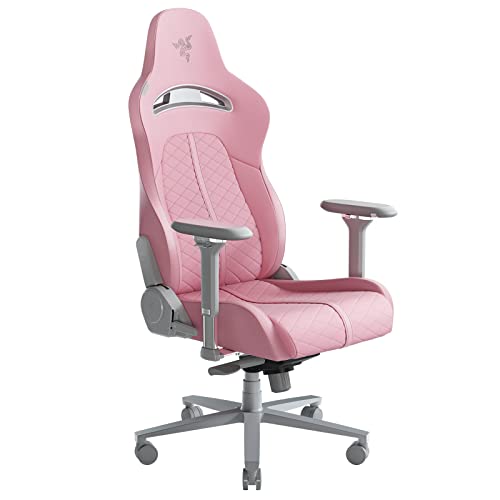
Razer Enki Standard Gaming Chair
Best for: Users wanting a softer seat and high recline
- Upholstery Material
- Eco-Friendly Synthetic Leather
- Lumbar Support
- Built-in Lumbar Arch
- Dimensions
- 26.8 × 26.4 × 55.5 inches
- Weight
- 53.2 pounds
View on Amazon: Razer Enki Standard Gaming Chair Affiliate link
The Razer Enki in Quartz Pink offers a dual-textured upholstery combining plush fabric and smooth synthetic leather. It features a built-in lumbar arch to support your lower back and a 152-degree recline for resting. The reactive seat tilt adjusts to your weight. This standard-sized chair weighs 53.2 pounds. It suits you if you prefer softer cushioning and a neutral sitting posture during long sessions.
Pros
- Built-in lumbar arch for lower back support
- Dual-textured upholstery with plush fabric and smooth leather
- 152-degree adjustable recline angle
- Reactive seat tilt mechanism
Cons
- Fixed built-in lumbar arch lacks manual adjustment
- Synthetic leather and fabric may trap heat
- 53.2-pound weight makes it heavy to move
Good fit if
- You want a softer seat base for comfort
- You need a high recline angle for resting
- You prefer dual-textured upholstery materials
Skip if
- You require adjustable lumbar support
- You need a breathable mesh backrest
- You want a lightweight chair under 40 pounds
Verdict: The Razer Enki Pink Gaming Chair fits you if you value a softer seat and a high recline. It provides fixed lumbar support and durable upholstery for long gaming sessions.
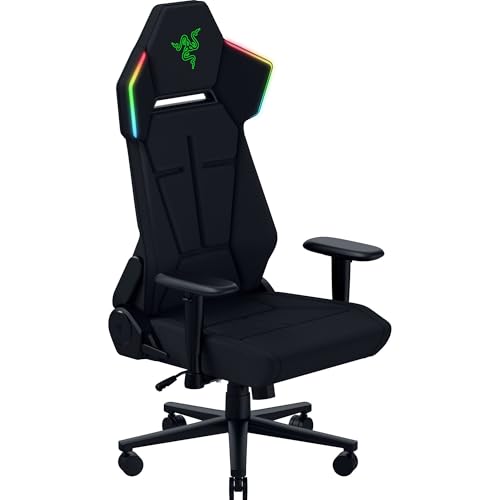
Razer Soma Chroma RGB Gaming Chair
Best for: gamers wanting reactive RGB and fixed support
- Lumbar Support
- Built-in
- Seat Cushion Type
- Dual-density foam
- Features
- Lumbar Support
- Color
- Black
- Dimensions
- 28.2 × 26.4 × 53.2 inches
- Weight
- 54 pounds
View on Amazon: Razer Soma Chroma RGB Gaming Chair Affiliate link
The Razer Soma Chroma is a black ergonomic chair featuring dual-density foam and a built-in lumbar arch. It supports up to 155 degrees of recline and includes reactive RGB lighting powered via USB-C. This model connects through Bluetooth or 2.4 GHz for control. It weighs 54 pounds and measures 26.4 inches wide. It suits users who want immersive lighting and flexible connectivity options.
Pros
- Dual-density foam seat cushion for balanced comfort
- Built-in lumbar arch for posture support
- Reactive RGB lighting syncs with 300+ games
- Reclines up to 155 degrees
- USB-C powered lighting for wire-free setups
Cons
- Heavier build at 54 pounds
- No adjustable lumbar depth or height
- Lumbar support is a fixed arch, not adjustable
Good fit if
- You want RGB lighting that reacts in real time
- You prefer a wire-free desk setup with USB-C power
- You need a chair that reclines for downtime
Skip if
- You need fully adjustable lumbar support
- You want a lightweight chair under 50 pounds
- You prefer a mesh seat for breathability
Verdict: The Razer Soma Chroma Gaming Chair fits gamers who value reactive lighting and a fixed ergonomic arch. It is a solid choice for those who want a recline feature and USB-C connectivity.
Specifications side by side
| Spec | Razer Iskur V2 X Gaming Chair | Razer Enki Standard Gaming Chair | Razer Soma Chroma RGB Gaming Chair |
|---|---|---|---|
| Upholstery Material | CoolTouch Gen-2 EPU leather | Eco-Friendly Synthetic Leather | not stated |
| Lumbar Support | integrated | Built-in Lumbar Arch | Built-in |
| Armrest Adjustability | 2D | not stated | not stated |
| Weight Capacity | 299 lb | not stated | not stated |
| Seat Cushion Type | cold-cured foam | not stated | Dual-density foam |
| Features | Lumbar Support | not stated | Lumbar Support |
| Material | Leather | Leather | not stated |
| Color | Cinnamoroll Edition | Quartz | Black |
| Dimensions | 27.6 × 27.6 × 53.6 inches | 26.8 × 26.4 × 55.5 inches | 28.2 × 26.4 × 53.2 inches |
| Weight | 43 pounds | 53.2 pounds | 54 pounds |
| Size | 27.58 x 27.58 x 53.58 inches | Standard | 26.4 x 28.17 x 53.19 inches |
| Model | RZ38-05311200-R3UA | RZ38-03720200-R3U1 | RZ38-04260100-R3US |
How to choose the right razer gaming chair
-
Check seat width for comfort
Seat width determines how much space you have for your legs. The Razer Iskur V2 X offers a 27.6-inch width, which is ideal if you sit cross-legged or prefer extra room. The Razer Enki and Soma are narrower at 26.4 inches. If you have broader hips or like to spread out, the wider seat prevents discomfort during long sessions. Measure your preferred sitting style to ensure the chair accommodates your body without restriction.
-
Consider total chair weight
The weight of the chair indicates its build mass and stability. Heavier chairs often feel more solid and durable. The Razer Soma weighs 54 pounds, making it the heaviest option. The Razer Enki follows at 53.2 pounds. The Razer Iskur V2 X is lighter at 43 pounds. A heavier frame may provide better stability for users who lean back frequently. Consider the weight capacity and overall heft to match your usage habits and floor surface requirements.
-
Evaluate recline capabilities
Recline range affects how you rest during breaks. The Razer Enki is noted for its high recline feature, allowing you to lean back significantly. This is useful if you take frequent breaks or like to watch videos in a relaxed position. Other models may offer different recline limits. Check the specifications for the maximum angle if you plan to use the chair for napping or casual lounging. A higher recline angle provides more versatility for different activities.
-
Assess lumbar support type
Lumbar support impacts lower back comfort during extended use. The Razer Iskur V2 X includes integrated lumbar support for consistent pressure. The Razer Enki provides fixed lumbar support, which may suit users who prefer a static fit. The Razer Soma features a fixed ergonomic arch. Integrated systems often adjust with your movement, while fixed supports maintain a constant position. Determine if you need dynamic support that moves with you or a static structure that holds your posture.
-
Review chair dimensions
Overall dimensions help you determine if the chair fits your space. The Razer Enki stands 55.5 inches tall, making it the tallest option. The Razer Iskur V2 X is 53.6 inches high, and the Razer Soma is 53.2 inches. Depth also varies, with the Soma measuring 28.2 inches long. Ensure your room has enough clearance for the height and depth. These measurements are critical for small rooms or desks with limited space behind them.
Frequently asked questions
Which Razer chair is best for cross-legged sitting?
The Razer Iskur V2 X is the best choice for this posture. Its seat width measures 27.6 inches, providing ample space for your legs. The other models, the Enki and Soma, are narrower at 26.4 inches. This extra width makes the Iskur V2 X more comfortable for users who prefer sitting with legs crossed.
Does the Razer Soma chair have RGB lighting?
Yes, the Razer Soma Chroma RGB Gaming Chair features reactive RGB lighting. It also includes USB-C connectivity for power. The chair offers a fixed ergonomic arch for support. This model is designed for gamers who want visual customization alongside functional ergonomic features during their sessions.
Which Razer chair has the softest seat?
The Razer Enki Standard Gaming Chair is designed for users who prefer a softer seat. It also supports high recline angles. The upholstery is built for durability during long gaming sessions. If you prioritize a plush feel over firm support, the Enki is the suitable option among the listed models.
How heavy is the Razer Iskur V2 X?
The Razer Iskur V2 X Gaming Chair weighs 43 pounds. It measures 53.6 inches in height and 27.6 inches in width. This model is lighter than the Enki and Soma, which both weigh over 53 pounds. The weight reflects its build and the materials used in its construction.
What is the difference between the Enki and Soma models?
The Enki focuses on a softer seat and high recline capabilities. The Soma emphasizes reactive RGB lighting and USB-C connectivity. Both chairs share a similar width of 26.4 inches. The Enki weighs 53.2 pounds, while the Soma is slightly heavier at 54 pounds. Choose based on your comfort and tech preferences.
Is the Razer Enki chair available in pink?
Yes, the Razer Enki Standard Gaming Chair is available in a Quartz color, which is a shade of pink. The model number is RZ38-03720200-R3U1. It is categorized as the best budget option for users who value a softer seat surface and high recline angles for extended use.