The Best Razer Gaming Chairs in 2026: 7 Picks
As an Amazon Associate we earn from qualifying purchases. Links on this page are affiliate links.
Razer offers a range of best razer gaming chairs designed for different body types and preferences. The lineup includes standard and wide seats, mesh and fabric upholstery, and models with integrated RGB lighting. We compared 7 options based strictly on published specifications. The top pick is the Razer Iskur V2 X Fabric Gaming Chair. It leads because it provides integrated lumbar support and breathable fabric upholstery for users who prioritize structured comfort.
Quick picks
Our 7 picks

Razer Iskur V2 X Fabric Gaming Chair
Best for: Users wanting integrated lumbar support and fabric upholstery
- Upholstery Material
- Fabric
- Lumbar Support
- Integrated
- Armrest Adjustability
- 2D
- Seat Cushion Type
- High-density foam
- Color
- Black
- Dimensions
- 27.6 × 27.6 × 49.6 inches
The Razer Iskur V2 X features an integrated lumbar arch and high-density foam cushions. It includes 2D adjustable armrests and a 152-degree recline. The fabric upholstery offers breathability. This standard-size chair weighs 50.3 pounds. It suits users seeking structured lower back support and a cool-to-the-touch seat surface for extended gaming sessions.
Pros
- Integrated lumbar arch for lower back support
- Widened seat base with reduced edges
- Contoured high-density foam cushions
- Adjustable 152-degree recline
- Plush fabric finish
Cons
- Limited to 2D armrest adjustability
- Standard size may not fit all body types
- Heavier build at 50.3 pounds
Good fit if
- You want built-in lumbar support without adjustment knobs
- You prefer breathable fabric over synthetic leather
- You need a 152-degree recline range
Skip if
- You require 4D armrest adjustments
- You need a mesh backrest for maximum airflow
- You prefer a lighter chair under 45 pounds
Verdict: The Razer Iskur V2 X Ergonomic Gaming Chair fits users who prioritize integrated lumbar support and a breathable fabric seat. It is ideal for those who want a structured, heavy-duty chair with basic armrest adjustments.
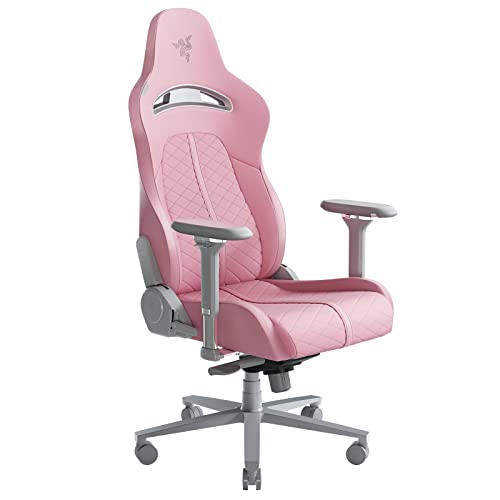
Razer Enki Standard Gaming Chair
Best for: Plush comfort with fixed lumbar support
- Upholstery Material
- Synthetic leather, textured fabric
- Lumbar Support
- Built-in lumbar arch
- Dimensions
- 26.8 × 26.4 × 55.5 inches
- Weight
- 53.2 pounds
The Razer Enki offers all-day comfort with a built-in lumbar arch and dual-textured upholstery. It features a 54-cm seat base and 152-degree recline. The reactive tilt adjusts to your weight. This standard size chair weighs 53.2 pounds. It suits gamers who prefer plush seating with firm back support. The quartz color adds a distinct look to your setup.
Pros
- Built-in lumbar arch for lower back support
- 152-degree adjustable recline angle
- Dual-textured synthetic leather and fabric upholstery
- Reactive seat tilt mechanism
Cons
- Fixed built-in lumbar arch lacks adjustability
- Heavier at 53.2 pounds compared to mesh options
- Standard size may not fit very tall users
Good fit if
- You want plush cushioning with firm back support
- You prefer a fixed lumbar curve over adjustable knobs
- You like a distinct quartz color scheme
Skip if
- You need fully adjustable lumbar depth or height
- You prioritize maximum breathability over synthetic leather
- You prefer a lightweight chair under 45 pounds
Verdict: Razer Enki Standard Quartz Gaming Chair provides solid support for long sessions. It fits users who value plush comfort and a fixed ergonomic curve over customizable adjustments.

Razer Iskur V2 X Gaming Chair
Best for: shorter users needing wide seat comfort
- Upholstery Material
- CoolTouch Gen-2 EPU leather
- Lumbar Support
- Integrated
- Armrest Adjustability
- 2D
- Weight Capacity
- 299 lb
- Seat Cushion Type
- High-density cold-cured foam
- Dimensions
- 27.6 × 27.6 × 49.6 inches
The Razer Iskur V2 X offers integrated lumbar support and a wide seat for flexible sitting. It uses CoolTouch Gen-2 EPU leather and high-density foam to resist sagging. You get 2D armrests and a 152-degree recline. It fits users 5.3 to 6.6 feet tall with a 299 lb capacity. This model provides all-day comfort for extended sessions.
Pros
- Integrated lumbar support reduces lower-back fatigue
- CoolTouch Gen-2 EPU leather feels cooler to the touch
- Ultra-wide seat base allows cross-legged sitting
- Reclines up to 152 degrees
- 2D adjustable armrests resist cracking
Cons
- 299 lb weight capacity is lower than many competitors
- 2D armrests offer less adjustment than 4D models
- No mention of mesh upholstery for breathability
Good fit if
- You are 5.3 to 6.6 feet tall
- You prefer a wide seat for cross-legged sitting
- You want integrated lumbar support without add-ons
Skip if
- You weigh more than 299 lb
- You need 4D armrests for full adjustability
- You require a mesh back for maximum airflow
Verdict: The Razer Iskur V2 X Ergonomic Chair fits users 5.3 to 6.6 feet tall who want integrated lumbar support and a wide seat for cross-legged positions.
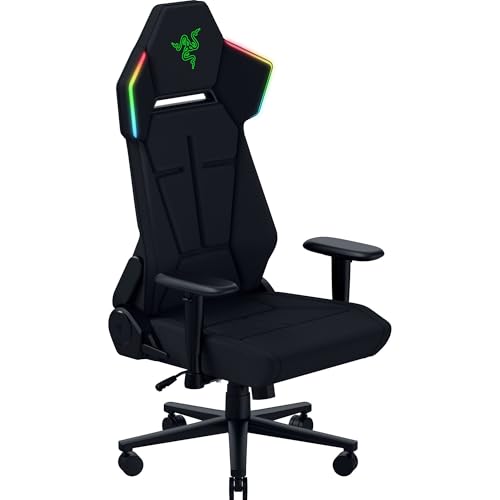
Razer Soma Chroma RGB Gaming Chair
Best for: synchronized RGB battlestation setups
- Lumbar Support
- Built-in arch
- Seat Cushion Type
- Dual-density foam
- Color
- Black
- Dimensions
- 28.2 × 26.4 × 53.2 inches
- Weight
- 54 pounds
The Razer Soma Chroma RGB Gaming Chair integrates reactive backrest lighting with ergonomic support. You get a built-in lumbar arch, dual-density foam cushioning, and a backrest that reclines up to 155 degrees. Connectivity includes 2.4 GHz wireless and Bluetooth alongside USB-C power delivery. This chair suits gamers who want integrated lighting effects alongside a steel frame foundation.
Pros
- Built-in Chroma RGB lighting with 2.4 GHz and Bluetooth controls
- Dual-density foam cushion with a built-in lumbar arch
- Backrest reclines up to 155°
- Durable reinforced steel frame
Cons
- Requires an external USB-C power source or battery bank for lights
- Built-in lumbar arch lacks depth or height adjustability
- Heavy build at 54 pounds
Good fit if
- You want reactive RGB lighting synced through Bluetooth or 2.4 GHz wireless.
- You prefer a dual-density foam seat with a 155-degree backrest recline.
- You already have a USB-C power bank or adapter setup at your desk.
Skip if
- You need fully adjustable lumbar support rather than a fixed arch.
- You want a lightweight chair under 54 pounds.
Verdict: Razer Soma Chroma RGB Gaming Chair is built for desk setups where synchronized reactive lighting and a 155-degree reclining steel frame take priority over mechanical lumbar adjustment.

Razer Enki X Gaming Chair
Best for: Users preferring fixed lumbar support and soft cushioning
- Upholstery Material
- Synthetic leather, textured fabric
- Lumbar Support
- Built-in arch
- Color
- Black
- Dimensions
- 26 × 26.4 × 49.4 inches
- Weight
- 47.6 pounds
The Razer Enki X Essential Gaming Chair offers all-day comfort through a built-in lumbar arch and optimized cushion density. It features dual-textured synthetic leather and plush fabric for refined support. The chair reclines up to 152 degrees and includes 110-degree shoulder arches. Weighing 47.6 pounds, it provides a stable base for long gaming sessions or work periods.
Pros
- Built-in lumbar arch supports lower back
- Reclines up to 152 degrees
- Dual-textured synthetic leather and fabric upholstery
- Optimized cushion density for comfort and support
Cons
- Lumbar support is fixed rather than adjustable
- Upholstery is synthetic leather, not mesh
- Weight of 47.6 pounds reduces portability
Good fit if
- You want a fixed lumbar curve
- You prefer a soft seat base
- You need a 152-degree recline
Skip if
- You require adjustable lumbar depth
- You prefer breathable mesh material
- You need a lighter chair under 40 pounds
Verdict: The Razer Enki X Essential Gaming Chair suits users who prioritize a soft seat and fixed back support over adjustability. It is a solid option for long sessions where a 152-degree recline and durable synthetic leather are key needs.

Razer Fujin Standard Mesh Gaming Chair
Best for: Breathable mesh seating for tall users
- Upholstery Material
- breathable mesh
- Lumbar Support
- height-adjustable
- Armrest Adjustability
- 3D
- Weight Capacity
- 299 lbs
- Color
- Black
- Dimensions
- 28 × 29 × 38.4 inches
The Razer Fujin is a mesh gaming chair designed for breathability and durability. It features height-adjustable lumbar support and 3D padded armrests for customizable comfort. The synchro-tilt technology adjusts to your posture automatically. It supports up to 299 lbs and fits users up to 6.6 ft tall. This chair suits those who prefer ventilated seating for long sessions.
Pros
- Breathable mesh upholstery for ventilation
- Height-adjustable lumbar support
- 3D padded armrests
- Synchro-tilt technology
- 299 lbs weight capacity
Cons
- No adjustable headrest mentioned
- Standard size may not fit very short users
- Mesh material lacks plush cushioning feel
Good fit if
- You prioritize breathability over plush padding
- You are up to 6.6 ft tall
- You want adjustable lumbar support
Skip if
- You need a headrest
- You prefer leather or fabric upholstery
- You are under 5 ft tall
Verdict: The Razer Fujin Mesh Ergonomic Gaming Chair is a solid choice for tall users who need breathable mesh and adjustable lumbar support.

Razer Iskur V2 Adaptive Lumbar Gaming Chair
Best for: Customizable lumbar support seekers
- Upholstery Material
- EPU-grade synthetic leather
- Lumbar Support
- Adaptive, adjustable curve
- Armrest Adjustability
- 4D
- Headrest Type
- Memory foam cushion
- Seat Cushion Type
- High-density foam
- Features
- Lumbar Support
The Razer Iskur V2 features an adaptive lumbar support system that shifts with your body weight. It includes fully adjustable lumbar curve controls for height and protrusion. High-density foam cushions provide firm support, while EPU-grade synthetic leather upholstery resists peeling. The chair offers 152-degree recline and 4D armrests. It suits users seeking customizable spinal support and durable materials.
Pros
- Adaptive lumbar support shifts with body weight
- Adjustable lumbar curve with 60 mm height and 40 mm protrusion
- High-density foam cushions maintain form
- EPU-grade synthetic leather resists peeling
- 152-degree recline and 4D armrests
Cons
- Heavier build at 61.7 pounds
- No mesh backrest for breathability
- Upholstery is synthetic leather, not genuine leather
Good fit if
- You need precise lumbar curve adjustments
- You prefer firm high-density foam support
- You want durable synthetic leather upholstery
Skip if
- You require a breathable mesh backrest
- You need a lighter chair under 50 pounds
- You prefer genuine leather materials
Verdict: The Razer Iskur V2 Gaming Chair fits users who need precise lumbar curve adjustments and firm high-density foam support.
Specifications side by side
| Spec | Razer Iskur V2 X Fabric Gaming Chair | Razer Enki Standard Gaming Chair | Razer Iskur V2 X Gaming Chair | Razer Soma Chroma RGB Gaming Chair | Razer Enki X Gaming Chair | Razer Fujin Standard Mesh Gaming Chair | Razer Iskur V2 Adaptive Lumbar Gaming Chair |
|---|---|---|---|---|---|---|---|
| Upholstery Material | Fabric | Synthetic leather, textured fabric | CoolTouch Gen-2 EPU leather | not specified | Synthetic leather, textured fabric | breathable mesh | EPU-grade synthetic leather |
| Lumbar Support | Integrated | Built-in lumbar arch | Integrated | Built-in arch | Built-in arch | height-adjustable | Adaptive, adjustable curve |
| Armrest Adjustability | 2D | not specified | 2D | not specified | not specified | 3D | 4D |
| Weight Capacity | not specified | not specified | 299 lb | not specified | not specified | 299 lbs | not specified |
| Headrest Type | not specified | not specified | not specified | not specified | not specified | not specified | Memory foam cushion |
| Seat Cushion Type | High-density foam | not specified | High-density cold-cured foam | Dual-density foam | not specified | not specified | High-density foam |
| Features | not specified | not specified | not specified | not specified | not specified | not specified | Lumbar Support |
| Material | not specified | not specified | not specified | not specified | not specified | Mesh | Leather |
| Color | Black | Quartz | Black/Green | Black | Black | Black | Black/Green |
| Dimensions | 27.6 × 27.6 × 49.6 inches | 26.8 × 26.4 × 55.5 inches | 27.6 × 27.6 × 49.6 inches | 28.2 × 26.4 × 53.2 inches | 26 × 26.4 × 49.4 inches | 28 × 29 × 38.4 inches | 26.8 × 26.8 × 55.2 inches |
| Weight | 50.3 pounds | 53.2 pounds | 43 pounds | 54 pounds | 47.6 pounds | 44.1 pounds | 61.7 pounds |
| Size | Standard | Standard | not specified | not specified | Standard | Standard | 26.79 inches x 26.79 inches x 55.16 inches |
| Model | RZ38-05310100-R3UA | RZ38-03720200-R3U1 | RZ38-05310700-R3US | RZ38-04260100-R3US | RZ38-03880700-R3U1 | RZ38-04950100-R3U1 | RZ38-04900100-R3U1 |
Razer Gaming Chairs Overview
The Razer Iskur V2 X Fabric and Iskur V2 Adaptive Lumbar chairs prioritize structured support. You get integrated or adjustable lumbar curves with firm high-density foam. These models suit users who want precise back alignment and heavy-duty construction for long sessions. The Iskur V2 X Fabric uses breathable upholstery, while the Adaptive Lumbar version offers leather comfort. Both provide reliable ergonomic foundations for focused work or play.
Other options focus on different needs. The Razer Enki Standard and Enki X deliver plush, fixed lumbar support with soft cushioning. If you prefer airflow, the Razer Fujin Standard Mesh chair offers breathable seating for tall users. The Razer Soma Chroma RGB stands out with immersive lighting and a steel frame. You can choose based on whether you value adjustability, breathability, or visual features.
Where Razer Fits Your Needs
Razer’s range spans from lighter, budget-friendly options to heavy, feature-rich premium models. You can choose between fabric, synthetic leather, or breathable mesh upholstery. Most chairs are standard size, though the Iskur V2 X offers a wider seat for cross-legged comfort. The Soma Chroma adds immersive RGB lighting, while the Fujin focuses on airflow for tall users. Note that all listed models are standard size; there are no wide or extra-large options in this specific lineup. You also get fixed or integrated lumbar support rather than complex mechanical adjustments in most cases.
If you are assembling a full rig, you can evaluate the best processors for gaming by their hardware specs.
How to choose the right Razer chair
-
Check lumbar adjustability
Your lower back support needs vary by preference. The Razer Iskur V2 Adaptive Lumbar chair offers precise curve adjustments for those who want custom fit. If you prefer a fixed ergonomic shape, the Razer Enki Standard provides a consistent contour without moving parts. Fixed support is simpler and requires no tweaking. Adjustable systems allow you to target specific pressure points. Decide if you need to change the support level daily or if a static curve is sufficient for your posture.
-
Select the right material
Upholstery affects breathability and feel. The Razer Fujin Standard Mesh chair uses breathable mesh seating, which is ideal for tall users who want airflow during long sessions. The Razer Iskur V2 X Fabric offers a structured, heavy-duty feel with good ventilation. Synthetic leather, found on the Enki X, provides a smooth surface but may retain heat. Fabric is durable and cool. Mesh is highly breathable. Leather offers a classic look. Choose based on your climate and how much you sweat.
-
Consider seat width
Seat dimensions impact comfort for different sitting styles. The Razer Iskur V2 X Gaming Chair features a wider seat, making it suitable for shorter users who sit cross-legged. Standard models like the Enki X have a narrower footprint. If you prefer a traditional seated position, a standard width is fine. If you often shift positions or sit with legs folded, the wider seat offers more room. Check the width spec to ensure your preferred posture fits without feeling cramped or unsupported.
-
Evaluate weight capacity
Chair weight indicates build quality and stability. Heavier chairs often use more steel and dense foam. The Razer Iskur V2 Adaptive Lumbar chair weighs 61.7 pounds, suggesting a robust frame. The lighter Iskur V2 X Fabric model is 50.3 pounds. A heavier chair may feel more stable and less likely to wobble. It also often implies higher density materials. If you are a larger user, a heavier chair might offer better long-term durability and support. Compare the weight to gauge the internal construction quality.
-
Decide on lighting features
RGB lighting adds visual immersion but is not essential for comfort. The Razer Soma Chroma Gaming Chair includes immersive RGB lighting with wireless control. This is a premium feature for gamers who want their setup to glow. Other models like the Iskur V2 focus purely on ergonomics without lights. If lighting is important to your gaming environment, the Soma Chroma is the clear choice. If you prefer a clean, professional look or do not care about aesthetics, skip the RGB models to save on complexity.
Frequently asked questions
Which Razer gaming chair is best for tall users?
The Razer Fujin Standard Mesh Gaming Chair is ideal for taller individuals. Its breathable mesh seat promotes airflow during long sessions. The chair measures 29 inches in width and 38.4 inches in height. This size accommodates larger frames better than standard models. Adjustable lumbar support helps maintain proper posture for extended use.
Does the Razer Iskur V2 have adjustable lumbar support?
Yes, the Razer Iskur V2 Adaptive Lumbar Gaming Chair features fully adjustable lumbar support. You can customize the curve to fit your spine precisely. This model uses firm high-density foam for consistent support. It weighs 61.7 pounds, indicating a sturdy steel frame. This setup suits users who need specific back alignment adjustments.
Which Razer chair is best for shorter users?
The Razer Iskur V2 X Gaming Chair fits users between 5.3 and 6.6 feet tall. It offers a wide seat suitable for cross-legged positions. The chair weighs 43 pounds, making it lighter than heavier premium options. Integrated lumbar support provides back alignment without complex adjustments. This model balances comfort and accessibility for shorter statures.
Are there Razer gaming chairs with RGB lighting?
The Razer Soma Chroma RGB Gaming Chair includes immersive lighting features. It offers wireless lighting control for customization. The chair uses a steel frame for stability and dual-density foam for comfort. It weighs 54 pounds and stands 53.2 inches high. This model is designed for gamers who want visual effects alongside ergonomic support.
Which Razer chair has the most recline?
The Razer Enki X Gaming Chair reclines up to 152 degrees. This wide range allows you to lean back significantly. The chair uses synthetic leather for durable cushioning. It weighs 47.6 pounds and measures 49.4 inches in height. Fixed lumbar support provides consistent back alignment throughout the recline range.
Is the Razer Enki Standard good for plush comfort?
The Razer Enki Standard Gaming Chair offers plush comfort with a fixed ergonomic curve. It suits users who prefer soft cushioning over adjustable parts. The chair weighs 53.2 pounds and stands 55.5 inches high. Its Quartz color option adds a distinct look. This model prioritizes comfort for long sessions rather than extensive adjustability.
Which Razer chair is best for breathability?
The Razer Iskur V2 X Fabric Gaming Chair uses breathable fabric upholstery. This material helps keep you cool during extended use. The chair weighs 50.3 pounds and measures 49.6 inches in height. Integrated lumbar support ensures back alignment without extra parts. This option is ideal for users who prioritize airflow and a structured seat.
What is the heaviest Razer gaming chair?
The Razer Iskur V2 Adaptive Lumbar Gaming Chair is the heaviest at 61.7 pounds. Its substantial weight suggests a heavy-duty steel frame. The chair measures 55.2 inches in height. Adjustable lumbar support allows for precise customization. This model is built for durability and firm support, making it suitable for users who want a stable, long-lasting chair.