Razer Soma Chroma RGB Gaming Chair or Razer Iskur V2 Adaptive Lumbar Gaming Chair? Which Razer Model to Buy
As an Amazon Associate we earn from qualifying purchases. Links on this page are affiliate links.
When comparing the razer soma chroma RGB gaming chair vs iskur v2 adaptive lumbar gaming chair, you find two distinct approaches to comfort and setup aesthetics. Both models offer reclining backrests for extended sessions and use durable foam cushions to support your body. The main difference lies in their core features: the Soma focuses on reactive RGB lighting and a minimalist, wire-free design, while the Iskur V2 prioritizes precise ergonomic adjustments with an adaptive lumbar system and memory foam headrest.
Key differences
| Aspect | Razer Soma Chroma RGB Gaming Chair | Razer Iskur V2 Adaptive Lumbar Gaming Chair |
|---|---|---|
| Lumbar Support | Built-in arch | Adaptive, adjustable curve |
| Headrest | Not listed | Memory foam cushion |
| Armrests | Not listed | 4D adjustable |
| Lighting | Reactive RGB via Bluetooth/2.4 GHz | None listed |
| Weight | 54 pounds | 61.7 pounds |
Which one should you choose?
Choose Razer Soma Chroma RGB Gaming Chair if
- You want a clutter-free setup with reactive RGB lighting that syncs with games.
- You prefer a lighter chair that is easier to move around your space.
- You value a dual-density foam seat for a balance of plushness and firm support.
Choose Razer Iskur V2 Adaptive Lumbar Gaming Chair if
- You need precise control over your lower back support with adjustable height and protrusion.
- You require a memory foam headrest to support your neck during long sessions.
- You want fully adjustable 4D armrests to customize your sitting position.
Verdict: The Razer Soma is the better choice if you prioritize aesthetic customization and a lighter, minimalist build. The Iskur V2 is superior for users who need highly adjustable ergonomic support and additional comfort features like a headrest and 4D armrests.
Ergonomics, Lighting, and Build Quality
Lumbar support type
The Razer Iskur V2 features an adaptive lumbar system with a spring-loaded design that shifts based on your body weight and angle. It includes specific knobs for up-to-down adjustment of 60 mm and front-to-back protrusion of 40 mm. This allows you to fine-tune the curve for your spine. In contrast, the Razer Soma Chroma uses a built-in lumbar arch. While this promotes proper posture, it lacks the manual adjustability found in the Iskur V2. If you need precise control over your lower back support, the Iskur V2 offers a clear advantage with its customizable mechanism.
Seat cushion material
Both chairs use foam, but the density and structure differ. The Razer Iskur V2 utilizes high-density foam for both the seat and backrest, designed to hold its form while molding to your body shape. The Razer Soma Chroma employs a dual-density foam seat cushion, combining firm support with a plush feel. This dual approach may offer a softer initial sit, whereas the high-density foam in the Iskur V2 prioritizes firm, long-term structural integrity. Your choice depends on whether you prefer a plush feel or firm, consistent support.
RGB lighting features
The Razer Soma Chroma is the only model of the two that includes immersive RGB lighting. It features Razer Chroma RGB that syncs with over 300 games and reacts in real time. You can control brightness and connection modes via a built-in panel supporting 2.4 GHz and Bluetooth, powered by USB-C. The Razer Iskur V2 does not list any lighting capabilities. If you want a setup that visually responds to your gaming environment, the Soma Chroma is the superior choice for aesthetic customization.
Armrest adjustability
The Razer Iskur V2 is equipped with 4D armrests that allow you to adjust height, position, and angle. This flexibility lets you tailor the armrests to your preferred sitting position for optimal comfort. The specifications for the Razer Soma Chroma do not mention armrest adjustability. Without this data, we cannot confirm if the Soma offers similar multi-directional adjustments. For users who require precise arm positioning to reduce shoulder strain, the Iskur V2 provides a distinct advantage with its documented 4D adjustability.
Recline capability
Both chairs offer significant recline options for relaxation and gaming. The Razer Soma Chroma backrest reclines up to 155 degrees, which is ideal for movies and downtime. The Razer Iskur V2 offers an adjustable recline of up to 152 degrees with reactive tilt that adapts to body weight. The Soma Chroma provides a slightly wider maximum recline angle by three degrees. However, the Iskur V2 adds reactive tilt mechanics. For pure maximum angle, the Soma Chroma edges out slightly, though both cover extensive ranges.
Headrest design
The Razer Iskur V2 includes a memory foam head cushion contoured to support your head and neck. This feature is explicitly listed in its specifications. The Razer Soma Chroma data does not mention a headrest or head cushion. If you frequently rest your head during breaks or long sessions, the Iskur V2 ensures neck support. The absence of headrest details for the Soma Chroma means it may lack this specific comfort feature. For users prioritizing neck support, the Iskur V2 is the better option.
Choose Your Razer Chair Model
Users wanting customizable lumbar support
The Iskur V2 features an adaptive lumbar system with spring-loaded support that shifts with your weight. You can adjust the height by 60 mm and protrusion by 40 mm. This precise control ensures your spine receives targeted support during long gaming sessions or work hours.
Gamers seeking immersive RGB effects
The Soma Chroma includes Razer Chroma RGB lighting that syncs with over 300 games. It offers 2.4 GHz and Bluetooth connectivity for easy control. The dual-density foam seat cushion provides lasting comfort, while the USB-C powered lighting keeps your setup clean and clutter-free.
Users needing adjustable armrests
The Iskur V2 comes with 4D armrests that adjust in height, position, and angle. This allows you to tailor the support to your preferred sitting position. The memory foam head cushion adds extra comfort for your neck, making it ideal for extended periods of use.
The products compared
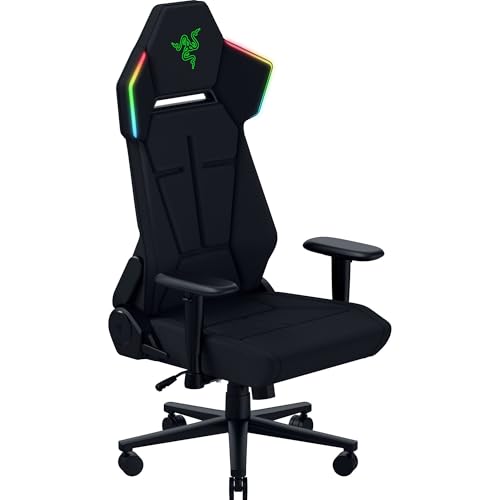
Razer Soma Chroma RGB Gaming Chair
Best for: Immersive RGB lighting and clean desk setups
- Lumbar Support
- Built-in
- Seat Cushion Type
- Dual-density foam
- Features
- Lumbar Support
- Color
- Black
- Dimensions
- 28.2 × 26.4 × 53.2 inches
- Weight
- 54 pounds
View on Amazon: Razer Soma Chroma RGB Gaming Chair Affiliate link
The Razer Soma Chroma features reactive RGB lighting powered via USB-C. It uses dual-density foam for seat cushioning and includes a built-in lumbar arch for posture support. The steel frame reclines up to 155 degrees. You can control lighting modes using Bluetooth or 2.4 GHz. This chair suits users who want immersive lighting effects and a clean, wire-free desk setup.
Pros
- Reactive RGB lighting syncs with over 300 games
- Dual-density foam seat cushion balances firmness and plush feel
- Built-in lumbar arch promotes proper posture
- Reclines up to 155 degrees for relaxation
- USB-C powered lighting allows clutter-free setups
Cons
- Built-in lumbar arch lacks the adjustable mechanism found in other models
- Weighs 54 pounds, making it heavier than some alternatives
- Lighting controls use a physical panel rather than a dedicated app
Good fit if
- You want immersive RGB lighting that reacts to gameplay
- You prefer a minimalist desk with USB-C powered devices
- You need a recline angle up to 155 degrees for downtime
Skip if
- You require fully adjustable adaptive lumbar support
- You want to control lighting through a mobile application
- You need a lighter chair for frequent moving
Verdict: Razer Soma Chroma RGB Gaming Chair fits gamers who prioritize reactive lighting and a clean desk over adjustable ergonomic mechanisms.

Razer Iskur V2 Adaptive Lumbar Gaming Chair
Best for: precise lumbar curve adjustment
- Upholstery Material
- EPU-grade synthetic leather
- Lumbar Support
- Adaptive, adjustable curve
- Armrest Adjustability
- 4D
- Headrest Type
- Memory foam cushion
- Seat Cushion Type
- High-density foam
- Features
- Lumbar Support
View on Amazon: Razer Iskur V2 Adaptive Lumbar Gaming Chair Affiliate link
The Razer Iskur V2 features an adaptive lumbar support system that shifts with your weight. You can adjust the curve height by 60 mm and protrusion by 40 mm. It uses high-density foam cushions and EPU-grade synthetic leather. The chair reclines up to 152 degrees and includes 4D armrests. It suits users who need precise spinal alignment and firm, durable seating.
Pros
- Adaptive spring-loaded lumbar support adjusts to body weight
- Adjustable lumbar curve with 60 mm height and 40 mm protrusion knobs
- High-density foam cushions maintain form and support posture
- EPU-grade synthetic leather resists peeling and cracking
- 4D armrests adjust height, position, and angle
Cons
- Heavy at 61.7 pounds
- No RGB lighting unlike the Soma Chroma
- Memory foam head cushion is fixed and not height-adjustable
Good fit if
- You want to customize the exact shape of your lumbar support
- You prefer firm, high-density foam over soft plush materials
- You need a recline angle up to 152 degrees
Skip if
- You want built-in RGB lighting effects
- You need a lightweight chair for frequent moving
- You require an adjustable headrest height
Verdict: Razer Iskur V2 Adaptive Lumbar Chair is a solid choice for gamers who prioritize precise, adjustable spinal support over aesthetic lighting. It fits users who value durable materials and firm seating comfort.
Specifications side by side
| Spec | Razer Soma Chroma RGB Gaming Chair | Razer Iskur V2 Adaptive Lumbar Gaming Chair |
|---|---|---|
| Upholstery Material | not stated | EPU-grade synthetic leather |
| Lumbar Support | Built-in | Adaptive, adjustable curve |
| Armrest Adjustability | not stated | 4D |
| Headrest Type | not stated | Memory foam cushion |
| Seat Cushion Type | Dual-density foam | High-density foam |
| Features | Lumbar Support | Lumbar Support |
| Material | not stated | Leather |
| Color | Black | Black/Green |
| Dimensions | 28.2 × 26.4 × 53.2 inches | 26.8 × 26.8 × 55.2 inches |
| Weight | 54 pounds | 61.7 pounds |
| Size | 26.4 x 28.17 x 53.19 inches | 26.79 inches x 26.79 inches x 55.16 inches |
| Model | RZ38-04260100-R3US | RZ38-04900100-R3U1 |
Frequently asked questions
Which Razer chair is better for tall users?
The Razer Iskur V2 is the better choice for taller users. Its height reaches 55.2 inches, which is taller than the Soma Chroma at 53.2 inches. The Iskur V2 also weighs more at 61.7 pounds compared to the Soma's 54 pounds. This extra mass and height often correlate with a larger seat frame for better fit.
Does the Razer Soma Chroma have adjustable lumbar support?
The provided specifications for the Razer Soma Chroma do not list adjustable lumbar support. It is described as fitting gamers who prioritize reactive lighting over adjustable ergonomic mechanisms. You should check the Iskur V2 if you need precise lumbar curve adjustment, as it features a specific adaptive system.
What are the exact dimensions of the Razer Soma Chroma?
The Razer Soma Chroma measures 26.4 inches in width, 28.2 inches in length, and 53.2 inches in height. It weighs 54 pounds. These dimensions provide a standard footprint for most desk setups while maintaining a lower profile height compared to the Iskur V2.
Is the Razer Iskur V2 heavier than the Soma?
Yes, the Razer Iskur V2 is significantly heavier. It weighs 61.7 pounds, while the Soma Chroma weighs 54 pounds. The Iskur V2 also has a slightly larger width at 26.8 inches compared to the Soma's 26.4 inches. This extra weight often indicates denser internal materials.
Which model features adaptive lumbar technology?
The Razer Iskur V2 Adaptive Lumbar Gaming Chair features adaptive lumbar technology. It includes a spring-loaded design that shifts based on your body weight and angle. You can also adjust the height by 60 mm and protrusion by 40 mm for precise spinal support.
What color options are available for these Razer chairs?
The Razer Soma Chroma is listed in Black. The Razer Iskur V2 is available in Black and Green. Both models offer dark colorways that blend well with standard gaming setups, though the Soma emphasizes clean aesthetics while the Iskur V2 adds green accents.
Which chair is better for a minimalist desk setup?
The Razer Soma Chroma is better for minimalist setups. It is designed for gamers who prioritize reactive lighting and a clean desk appearance. Its solid Black color and lack of visible mechanical lumbar knobs create a smoother visual profile compared to the Iskur V2.